How to download Facebook videos in HD with SaveFB
Looking for the simplest way to save your favorite Facebook videos? No complex software or technical skills needed. This guide will show you how to use SaveFB to download any video on Facebook to your device in just a few clicks, ensuring a fast and easy experience.
SaveFB is an online Facebook downloader developed for high-quality video downloads or fast MP3 conversion. It allows you to download videos directly in your browser, eliminating the need for third-party apps while ensuring maximum privacy and speed.
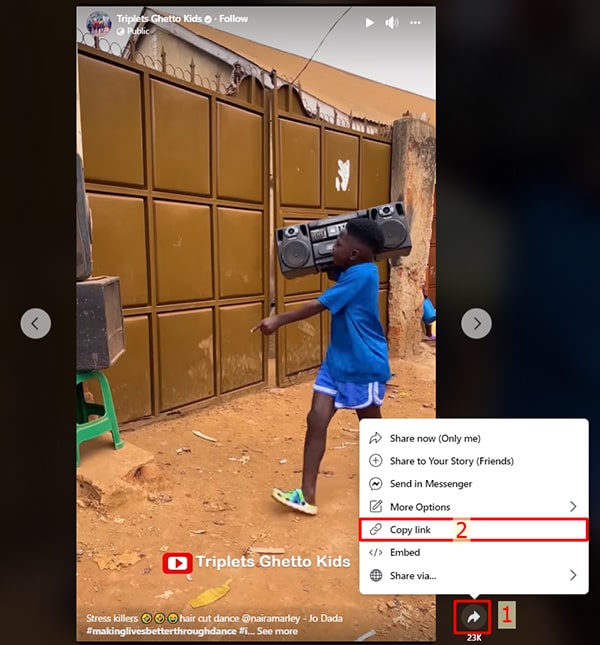
Step 1: Retrieve the Facebook Video URL
- Cross-Platform (PC, Mac, Android, iOS): Open the Facebook app or site, find your video, tap Share and select Copy Link to save the URL to your clipboard.
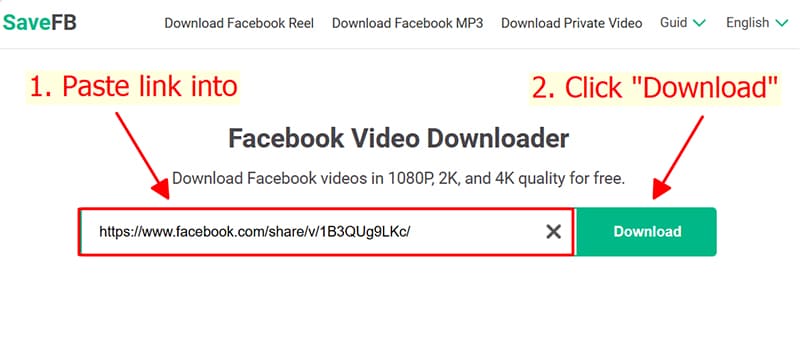
Step 2: Import the Facebook link to SaveFB
- Visit our portal Savefb.to, drop the URL into the input field, and trigger the Download process.
Step 3: Finalize and Save Media
- Choose between MP4 or MP3, then click Download (or Render for HD+). Wait a few seconds for the system to prepare and store the file on your device.
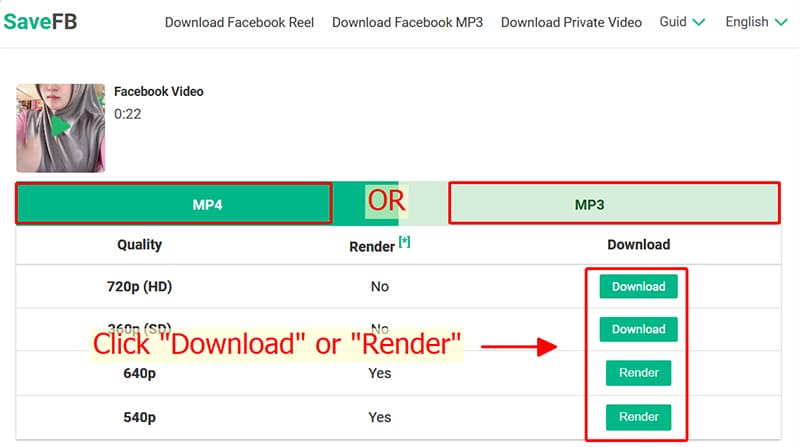
- Note for HD+ Content: To maintain maximum quality, high-definition Facebook videos require SaveFB to process visuals and audio separately before merging them. This advanced rendering may take a few moments to finalize.
- Encountered a 'Private Video' error? Don't worry, simply switch to our specialized Facebook Private Downloader tool and follow the steps to unlock and save the content easily.
If you encounter any problems while using SaveFB, please contact us immediately for assistance: contact@savefb.to