Download Private Facebook Videos

Download private Facebook videos in the highest quality: 1080P, 2K & 4K

How to download private Facebook videos using SaveFB

Download private Facebook videos is a tool that allows you to download private Facebook videos, videos from fan pages, videos from private or secret groups, etc. It supports downloading Facebook videos directly in your web browser, without installing any software. With just a few simple steps, SaveFB will help you download private Facebook videos in the highest quality: HD 1080P, 2K, and 4K (with sound).

Private video on Facebook are videos that the account owner has set to private. In this mode, only accounts that are friends with or have been granted permission to view the videos uploaded by that account can see them. Downloading private videos is more complicated than downloading regular (public) videos. Follow the instructions below:

Note: It's best to use this feature on your computer's browser.

  • Go to Facebook.com using a web browser → Find the video you want to download → Click on the posting time.
    Click on the posting time to open the post on Facebook.
  • Press Ctrl+U (Windows) or ⌘-Option-U (Mac) to view the page source code.
    OR
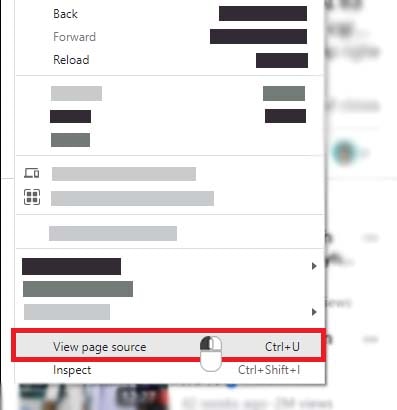
    Right click on any part of the page, then click the View page source option.
    Right-click and select View page source
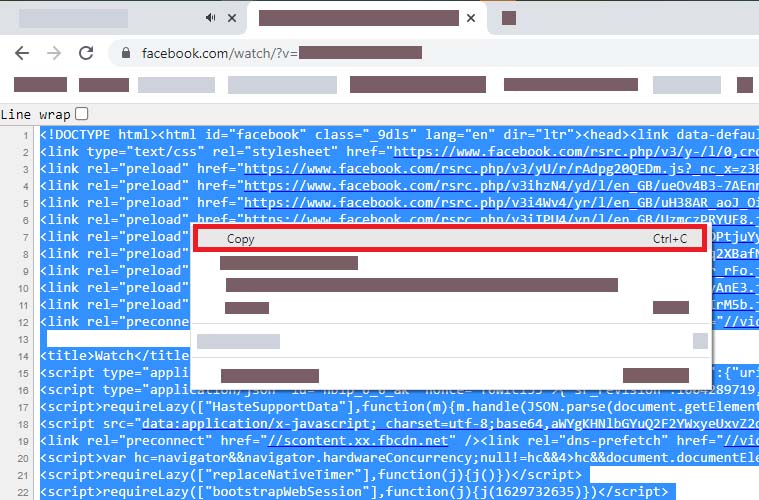
  • Highlight all source code by pressing Ctrl + A (Windows) or ⌘ + A (Mac), then right-click and select "Copy".
    Highlight and copy all source data from the page
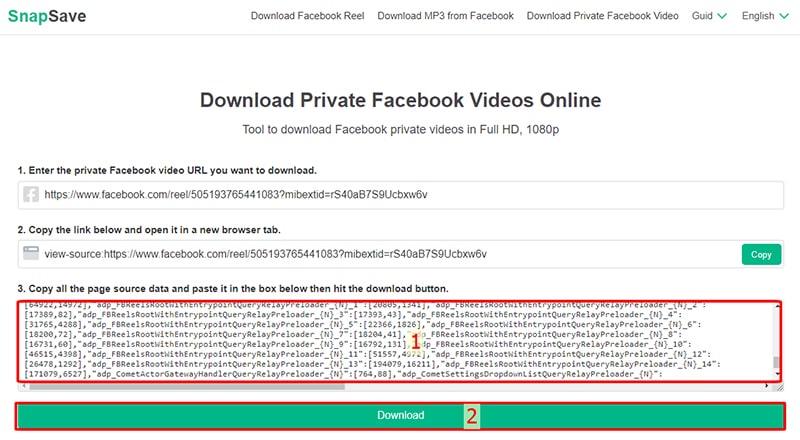
  • Access the website https://savefb.to/en/download-facebook-private (Facebook Private Video Downloader) and paste the copied source code into input box number 3, then click the Download button.
    Paste it into input box number 3 on savefb and press the submit button
  • Finally, press the Download or Render button and wait a few seconds for the file to download to your device.

Why should you use SaveFB - the private Facebook video downloader?

SaveFB.to is a web browser-based tool that works well on any device without needing to install any additional software. Furthermore, we do not collect user information and do not store downloaded videos or copies of them. Therefore, considering criteria such as ease of use, stable operation, support for all devices, safety, and anonymity, SaveFB meets all requirements. It's definitely one of the most effective tools for downloading Facebook videos currently available!

Private Facebook Videos: For videos that are private or restricted by country, we cannot extract data in the usual way. You need to extract the video's data manually, so the download steps will be more complicated than for public videos.

Frequently Asked Questions

Is it free to download private Facebook videos?

IT'S ALL FREE! All features on the SaveFB tool are provided free of charge, including the private Facebook video download feature. You can use it freely without any limitations on features or the number of downloads.

Can I download other people's private videos?

If your account is friends with the poster's account or the poster has given you permission to view the content, you can use SaveFB's private video downloader to easily download these videos.

Is downloading private videos on Facebook legal?

You can download private Facebook videos to your device, as long as you don't use the videos for commercial purposes. If so, you ask for permission and get consent from the video owner.